Class 2: Feedback & Critique
Second class - giving and receiving feedback, first prototype presentation.
February 2, 2026
Due This Week
- First prototype
- Project journal started
Class Resources
Keyword Exercise
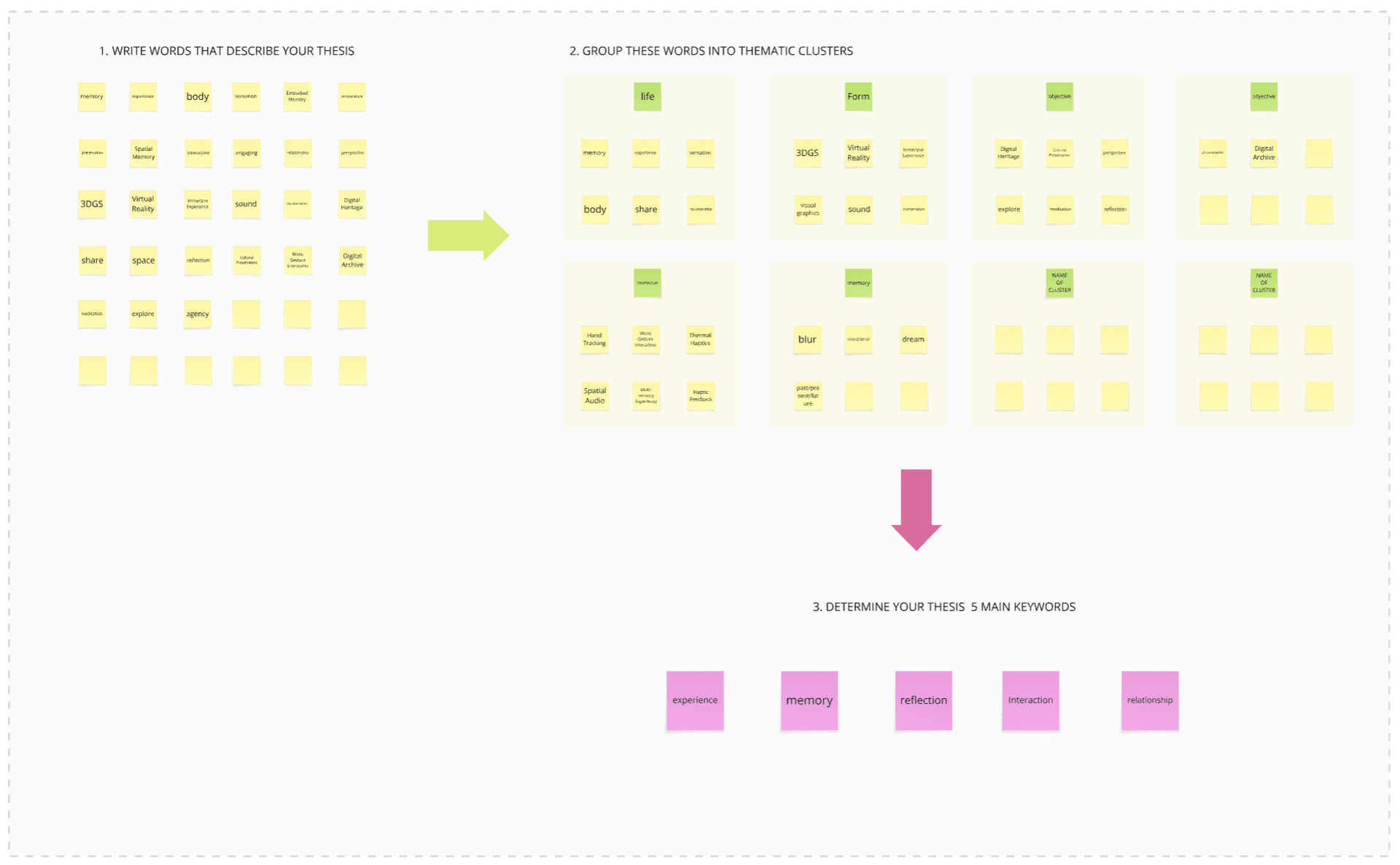
1. Words that describe my thesis:
| memory | experience | body | sensation | Embodied Memory |
| preservation | Spatial Memory | interaction | engaging | perspective |
| 3DGS | Virtual Reality | Immersive Experience | sound | Digital Heritage |
| share | space | reflection | Micro Gesture Interaction | Digital Archive |
| replication | explore | agency |
2. Thematic Clusters:
| Life | Form | Sensation | Objective |
|---|---|---|---|
| memory | 3DGS | blur | Digital Heritage |
| experience | Virtual Reality | dream | Cultural Preservation |
| sensation | visual graphics | perspective | |
| body | sound | explore | |
| share | Hand Tracking | perception | |
| Thermal Haptics | reflection | ||
| Spatial Audio | |||
| Multi-sensory Experience | |||
| Haptic Feedback |
3. My 5 Main Keywords:
| experience | memory | reflection | interaction | relationship |
System Architecture
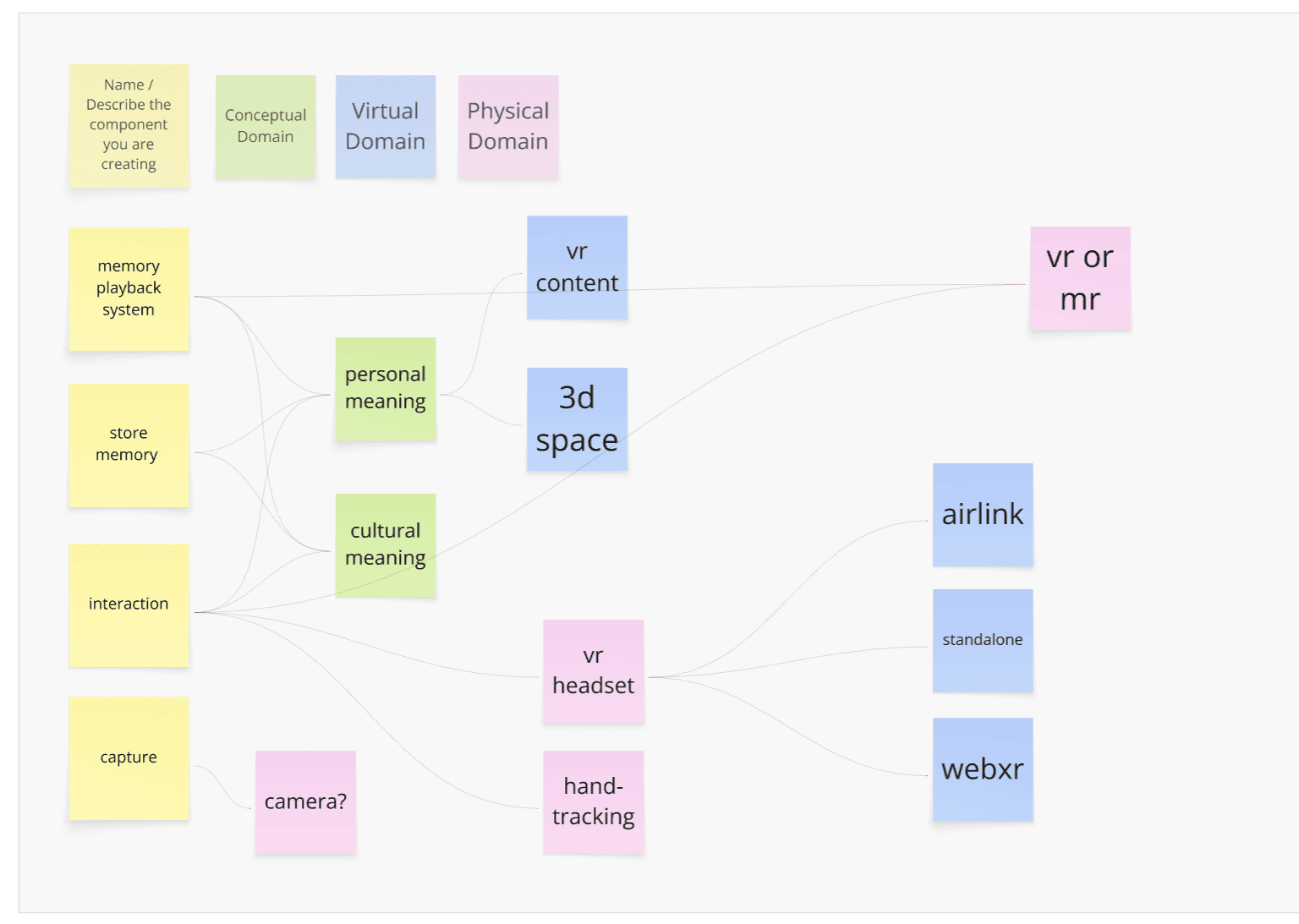
Three Domains:
| Conceptual | Virtual | Physical |
|---|---|---|
| personal meaning | vr content | vr or mr |
| cultural meaning | 3d space | airlink |
| vr headset | standalone | |
| hand-tracking | webxr | |
| camera? |
Components:
- memory playback system — core concept
- store memory — capture and archive
- interaction — how users engage
- capture — input method (camera?)
My Progress
Prototype Work
This week I focused on technical experiments to verify the pipeline:
-
3DGS Relighting - Tested XVerse Plugin in UE5.5
- Issues: quality loss after format conversion, model breaks with relight enabled
-
VR Integration - Meta Quest 3 with hand tracking
- Micro gesture: pinch left thumb to teleport
- Works well, inspired new direction
-
Third-person walkthrough - Testing different perspectives
- Need to compare with first-person VR
See Week 1 Documentation for full details.
Emerging Direction
Memory Editor & Playback System
- Interact with spatial memory like video (play, pause, rewind)
- Research 4DGS for temporal capture
- Micro gestures for timeline control
Multi-sensory Integration
- Haptics (heat) - thermal feedback for emotional recall
- Spatial audio - soundscape as part of memory
Notes
Conceptual Distinction: Archive vs Revisit vs Edit
| Term | Meaning | Implication |
|---|---|---|
| Archive | Preservation | Static, unchanged |
| Revisit | Personal return | For self, experiential |
| Edit | Adjust for sharing | Implies audience, like editing a post before publishing |
Insight: “Edit” carries a connotation of preparing for others — color grading, trimming to watchable length. It’s not wrong, but it’s different from personal revisiting.
Two possible use cases:
| Context | Purpose | Interaction |
|---|---|---|
| Personal Revisit | Return to your own memory | Play/pause, timeline scrub, change perspective |
| Edit for Sharing | Let others experience it | Color grade, trim, add narrative structure |
Questions to explore:
- Memory for self vs. Memory for others — are these fundamentally different?
- When a memory is “edited” for others, is it still the same memory?
- Does the act of editing change your relationship to the memory?
Lecture Notes
CM (Camila Morales) - Thesis Mapping
Schedule Reminders:
- Demo Day: March 11 (one month away)
- Papers due: April 13
- Final critiques: May 6
- Showcase: May 7
- Design line opens tomorrow - get certifications/trainings done
Thesis Mapping Exercise:
- Start with 5 main keywords that describe your thesis
- Stream of consciousness writing - be playful
- Physical writing (sketchbooks) can help vs. typing
- Create maps showing hierarchies and relationships between words
- Early table of contents helps identify research gaps
CM’s Thesis Story (RISD 2013):
- Interactive architecture - technology embedded in architecture, not applied
- Her column installation broke the night before thesis presentation
- Key lesson: Don’t be afraid of failure - she still succeeded because of all the prototypes and documentation
- The work continued after graduation - the failed piece eventually made it to a gallery
“Think about the work you’re doing now as the very beginning of the rest of your creative practice.”
“Being able to feel comfortable in failure is the biggest asset any student can have.”
MFG (Matt Griffin) - Three Domains
Core Concept: You’re making things three times
| Domain | Description | Example (3D Printing) |
|---|---|---|
| Conceptual | Planning, decisions, requirements | Decide what to make |
| Virtual | Design, templates, digital models | Create in CAD software |
| Physical | Execution, material, final form | Print with specific material/settings |
Exercise: Break down your project components across three domains
- Identify blockers and decisions that delay future steps
- Find the path from concept to physical result
Provocative Questions:
-
What is the most complex component of your project?
- What functional role does it play?
- What happens if you don’t succeed in making this?
- → Maybe simplify if it’s decorative, not essential
-
What single decision is delaying the most future steps?
- Can you make that decision right now?
- Imagine making a “crazy choice” and carry it through
- → Helps recognize your internal rudder
-
What component is the easiest to complete?
- Can you complete it today?
- If not, is there something easier you can do today?
- → Build momentum, unblock yourself
Key Advice:
- Material selection is always key - don’t wait to decide
- Identify “gotchas” - things that will unexpectedly take more time
- Talk to instructors about fabrication processes, especially if parts are new to you
Note on “Material Selection” for digital/VR projects: For physical fabrication, this means choosing materials early (PLA vs resin vs metal). For VR/digital projects, the equivalent decisions are:
- Platform: Quest standalone vs. PC VR (Airlink)
- 3DGS tools: PostShot vs. other training software
- Interaction: hand tracking vs. controllers
- Distribution: WebXR vs. native app
These foundational choices affect everything downstream — decide early so iterations stay focused.
Feedback Received
(To be filled during/after class)
Next Steps
- Prepare questions for one-on-one meeting (Week 3)
- Research 4DGS tools and pipelines
- Continue prototyping interaction gestures
- Start project journal documentation