Tech Dev
System architecture and implementation reference for the spatial memory archive.
Last updated: March 29, 2026
System overview
A three-layer pipeline. Spaces are captured offline, trained as 3D Gaussian Splatting (3DGS) models, and rendered in real time inside a VR runtime built on Unreal Engine 5 and running standalone on Meta Quest 3.
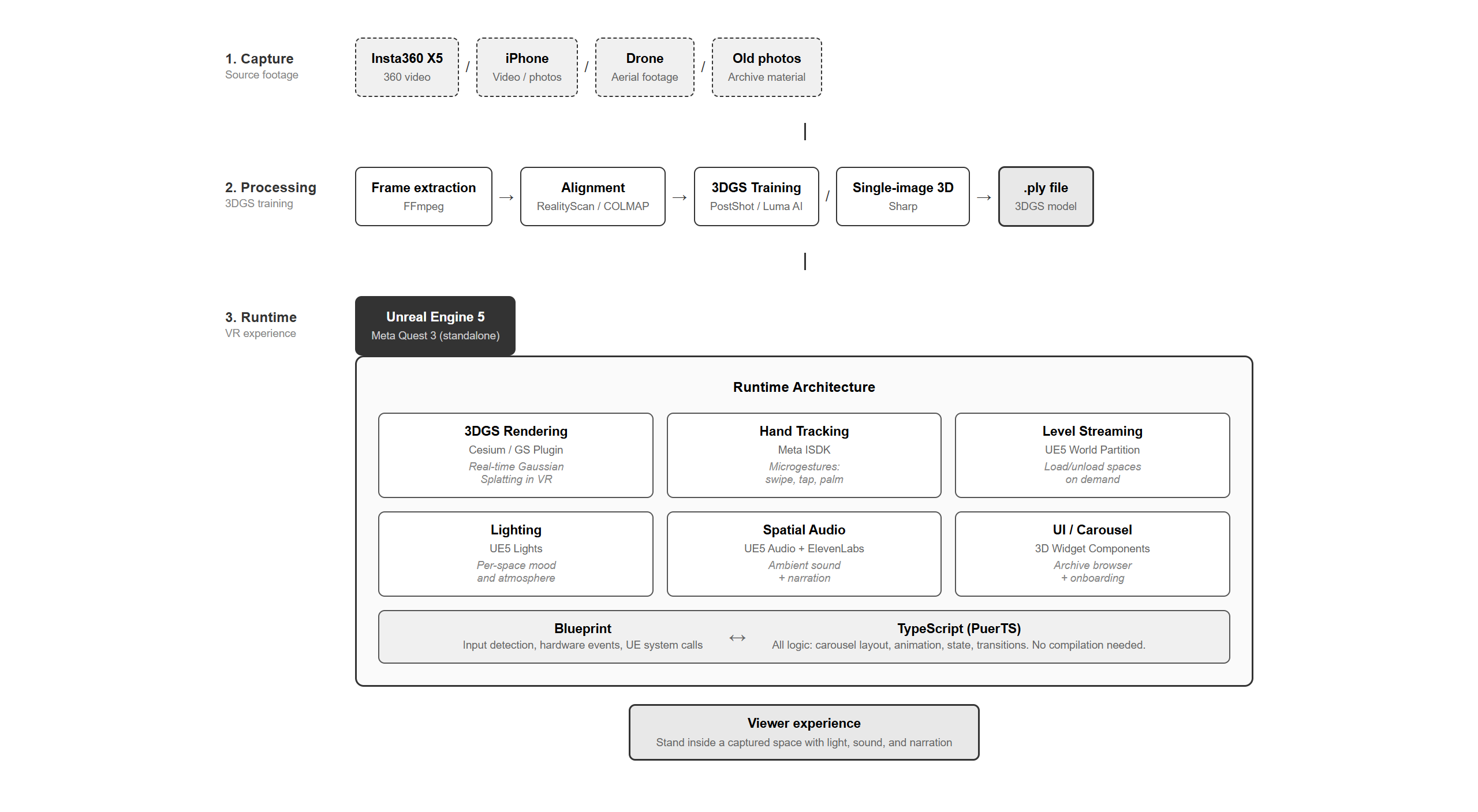
The runtime is the most opinionated part. Most VR applications keep all interaction logic in Blueprint. Here, Blueprint handles only input detection, hardware events, and UE system calls; everything that decides what happens (carousel layout, animations, level transitions, onboarding state) is written in TypeScript via PuerTS. This split was the single biggest productivity gain: TypeScript hot-reloads instantly, no engine recompilation.
Capture pipeline

Source footage is whatever I had: an Insta360 X5 360-degree video for places I could revisit, an iPhone clip for casual memories, single archive photos for places that no longer exist. Frames are extracted with ffmpeg, aligned in COLMAP or RealityScan, and trained as 3DGS in PostShot or Luma AI. For older memories where only a single photograph remained, I used Sharp (Mescheder et al., 2025) to generate a 3DGS scene from one image. Each finished scene exports to a .ply file ready for Unreal.
Runtime stack
The Quest 3 runs the entire experience standalone (no PC tether). The runtime is composed of:
- 3DGS rendering — SplatRenderer, an open-source UE5 plugin I wrote. Renders both static
.plyscenes and animated.gsd(4DGS) sequences via custom compute shaders, hitting 100+ FPS at 2M+ Gaussians on RTX 4080. - Hand tracking — Meta Interaction SDK (ISDK). Pinch to select cards, palm-up gesture summons the navigation menu.
- Lighting — UE5 Directional / Sphere / Spotlights tuned per space to match how the place is remembered, not how the camera captured it.
- Spatial audio — UE5 Audio + ambient sound beds + ElevenLabs text-to-speech narration.
- Level streaming — UE5 World Partition. Each captured space is its own level, loaded on demand when a card is selected.
- UI / carousel — UMG Widget components rendered in 3D space via ISDK ray-interactable widgets.
- Logic — TypeScript via PuerTS. All carousel layout, animations, fade transitions, level streaming sequencing, and onboarding state lives here.
Interaction flow

The viewer’s full journey is described on the project page. The implementation that drives each moment is detailed below.
Implementation reference
A working reference for the technical pieces. Continuously updated during the build.
Earlier exploration: embedded media inside captured space
Before the carousel design, the project began with an experiment: embedding photos and videos inside a single captured space (the Brooklyn apartment), so memories surfaced from the locations where they happened.
- Source video:
IMG_0922.MOV(iPhone), Brooklyn apartment, processed in Luma AI - Unreal project path:
Content/Movies/IMG_0922.MOV
BP_Clip
Each BP_Clip instance = one memory fragment placed in the level.
Actor Structure
BP_Clip (Actor)
|
+-- Root (Scene Component)
|   = Memory location in the space (e.g., desk surface, window, kitchen counter)
|
+-- Plane (Static Mesh: Plane)
|   Child of Root
|   = The visible frame (video or photo)
|   Material: Dynamic Material Instance
|       Video: Media Texture from Media Player
|       Photo: Texture2D
|
+-- MediaSoundComponent
    = Audio output, linked to Media Player in BeginPlay
Variables (Instance Editable)
| Variable | Type | Purpose |
|---|---|---|
bIsVideo | Boolean | Photo or video clip |
MediaPlayer | Media Player Object Ref | MP_ClipXX |
MediaSource | Media Source Object Ref | MS_ClipXX |
MediaTexture | Media Texture Object Ref | MT_ClipXX |
ClipTexture | Texture2D | Photo texture (when not video) |
PlaneSize | Float | Frame dimensions |
TriggerDistance | Float | How close viewer needs to be |
ActivationAngle | Float | Outer threshold in degrees |
FullRevealAngle | Float | Inner threshold in degrees |
Blueprint Logic
Construction Script:
Create Dynamic Material Instance → SET DynMaterial
  → Branch: bIsVideo?
      True:  Set Texture Parameter Value ("BaseTexture", MediaTexture)
      False: Set Texture Parameter Value ("BaseTexture", ClipTexture)
BeginPlay:
Branch: bIsVideo?
  True:
    → MediaSound → Set Media Player (MediaPlayer)
    → MediaPlayer → Open Source (MediaSource)
  False:
    → (nothing)
Note: Play on Open enabled on Media Player asset. No need to call Play in BeginPlay.
Event Tick:
1. Gaze Detection:
   distFactor = remap Distance(Player, Root) from TriggerDistance..0 → 0..1
   angleFactor = remap Dot(PlayerForward, DirToPlane) from cos(ActivationAngle)..1 → 0..1
   openFactor = distFactor * angleFactor

2. Smooth lerp:
   currentOpen = FInterpTo(currentOpen, openFactor, DeltaTime, smoothing)

3. Set opacity:
   DynMaterial → Set Scalar Parameter Value ("Opacity", currentOpen)

4. Video control (if bIsVideo):
   currentOpen > 0.1 AND not playing → Play
   currentOpen <= 0.1 AND playing → Pause

5. Volume:
   MediaSound → Set Volume Multiplier (currentOpen)
Gaze Detection Details
angleFactoruses direction from player to Plane, not Root’s ForwardVector- Combined trigger:
openFactor = distFactor * angleFactorgives smooth gradient, not hard on/off - Ease-in curves:
t*t*t(cubic) on distFactor,t*t(quadratic) on angleFactor before combining - Smooth lerp via FInterpTo prevents popping on quick head movement
Placement Workflow
- Create BP_Clip instance in level
- Position Root at memory’s location (desk surface, window, etc.)
- Rotate Root so Plane faces natural viewing direction
- Adjust PlaneSize
- Assign media (set bIsVideo, fill MediaPlayer/MediaSource/MediaTexture or ClipTexture)
Media Asset Naming
One set per clip:
| Asset | Naming | Type |
|---|---|---|
| File Media Source | MS_Clip01 | File Media Source |
| Media Player | MP_Clip01 | Media Player |
| Media Texture | MT_Clip01 | Media Texture |
Material: M_Clip
Shared material for photo and video. Both feed into the same BaseTexture parameter.
Properties:
- Blend Mode: Translucent
- Shading Model: Unlit
- Two Sided: Yes
Nodes:
[TextureSampleParameter2D: "BaseTexture"] → RGB → Emissive Color
                                          → A (Alpha)
                                             → Multiply ← [ScalarParameter: "Opacity"]
                                                → Opacity
Opacity = Texture Alpha × openFactor. This single setup handles three cases:
- Video: Media Texture has no alpha channel (A = 1), so opacity is purely controlled by openFactor
- Regular photo: same as video, A = 1 everywhere, opacity = openFactor
- Alpha-masked photo: transparent areas (A = 0) stay transparent regardless of openFactor; visible areas (A = 1) fade in/out with openFactor
Without the Alpha multiply, background-removed photos show black where the background was removed (alpha = 0 but opacity is forced by openFactor alone). Connecting the texture’s Alpha channel is required for transparent backgrounds to work.
BP_ExperienceManager
Manages overall experience arc and space decay.
BP_ExperienceManager
+-- On Begin Play: find all BP_Clip actors in level
+-- Track discovered count (listen for BP_Clip discovery events)
+-- Space Decay:
|   discoveredRatio = discoveredCount / totalClips
|   Adjust 3DGS splat count and size based on ratio
|   Lerp from full fidelity → particle abstraction
+-- Experience Arc:
    Build (timelapse of apartment setup)
    Explore (viewer moves, discovers clips)
    Decay (space dissolves as clips are found)
    Dismantle (timelapse of apartment teardown)
Sun / Sky System
Directional Light pitch rotation = sun position.
| Pitch | Time |
|---|---|
| 0° | Sunrise (horizon) |
| -90° | Noon (directly above) |
| -180° | Sunset (horizon) |
| beyond -180° | Night (below horizon) |
Components:
- Directional Light: rotate Pitch to change time of day
- Sky_Sphere: set Directional Light Actor reference. Must call Refresh Material after every rotation change at runtime
- Skylight: set to Real Time Capture for auto-updating environment light
Blueprint (Timeline):
Timeline (Float Track: "SunPitch", 0→-180 over N seconds)
  → Make Rotator (Pitch: SunPitch)
    → Dir Light → Set Actor Rotation
      → Sky_Sphere → Refresh Material
Plan: connect Timeline playback position to discoveredRatio from BP_ExperienceManager.
3DGS + Translucent Material
3DGS splats and Translucent materials conflict in rendering order. Translucent planes are invisible when placed inside a 3DGS scene because 3DGS splats render on top.
Fix: Set Translucency Sort Priority on the Plane component. Higher value = renders on top of 3DGS splats. Tried DitheredTemporalAA as an alternative blend mode, but it produces a visible dot pattern. Translucent + Sort Priority is the cleanest solution.
Integrating 2D Media into 3DGS
The 3DGS scene already has heavy texture, fragmentation, and splat artifacts at every edge. Adding rectangular photos with sharp borders looks wrong: the clean edges clash with the organic, broken quality of the 3DGS world.
What works: Alpha-masked (background-removed) photos. With transparent backgrounds, the photo content blends into the splat environment because there are no hard rectangular edges to break the illusion. The visible content (food on a plate, a view through a window) appears to belong to the space.
Design takeaway: Anything placed inside the 3DGS scene needs to be clean and borderless. The 3DGS environment provides all the texture; the inserted media should only show the subject itself.
Technical Notes
- Open Source is async: calling Play immediately after Open Source fails. Enable Play on Open on the Media Player asset instead.
- Instance Editable: all media variables (MediaPlayer, MediaSource, MediaTexture) must be Instance Editable, or you can’t assign them per-instance in the level.
- Sky_Sphere Refresh Material: only updates in editor on manual click. At runtime, must be called via Blueprint after every Dir Light rotation change. Does NOT work in Construction Script for runtime changes.
- Room scale: 4x4x4 room, TriggerDistance=500 works well.
- Plane orientation: needs Y=90 rotation to stand upright.
- iPhone photos: 3024x4032 (3:4 ratio), mix of portrait and landscape.
TS_WidgetCarousel (PuerTS)
Archive selection carousel written in TypeScript via PuerTS. Replaces the original BP_ArchiveCarousel.
Source: TypeScript/TS_WidgetCarousel.ts
Architecture
Blueprint handles input detection (microgestures, pinch), TypeScript handles all logic. Communication via BP-callable functions (no @no_blueprint decorator).
BP_MRPawn (input detection)
  → IA_MG_L_LeftSwipe → CarouselRef.SwipeLeft()
  → IA_MG_L_RightSwipe → CarouselRef.SwipeRight()
  → Both hands pinch → CarouselRef.UpdatePinchZoom(distance)
  → Either hand release → CarouselRef.EndPinchZoom()

WBP_PalmMenu → Event Dispatcher on Pawn → CarouselRef.ToggleCarousel()
Layout
18 cards (3 rings x 6 cards) on a 180-degree spherical arc. Virtual scrolling: 3 visible rings over 7 data rows with wrap-around.
| Parameter | Value |
|---|---|
| CarouselRadius | 110 |
| RingVerticalSpacing | 38 |
| CardDrawSize | 640 x 360 |
| BaseWorldScale | 0.07 |
| ArcDegrees | 180 |
| Zoom range | 1.0 - 5.0 (default 1.5) |
IsdkInteractableWidgetComponent
Replaced standard WidgetComponent with Meta’s ISDK version for native ray + poke interactable support.
| Setting | Value | Notes |
|---|---|---|
| WidgetScale | 1.0 | Default is 0.02 - must override |
| bUseRoundedBoxMaterial | true | Rounded corners |
| CornerRadius | (30,30,30,30) | |
| BlendMode | Transparent | Masked causes aliasing |
| TranslucencySortPriority | 100 | Renders above 3DGS |
| bCreatePokeInteractable | true | Poke doesn’t work with manual SetWidget (known) |
| bCreateRayInteractable | true | Ray + pinch works |
| PointablePlane size | CardDrawWidth * ws * 0.85 | Default 20x20 is too small |
Card Interaction
- Ray + Pinch: works via ISDK. Click fires OnCardClicked delegate.
- ThumbTap: works via BP-callable
HandleCardClicked(index). - Poke: does not work when widget is created manually with SetWidget (ISDK limitation).
- Click dedup: 0.2s same-card filter using
GetRealTimeSeconds(). - Hover:
HandleCardHovered(index)callsSetFocused(true/false)on all cards.
Opacity
Only SetRenderOpacity() on the cached root SizeBox widget works. Other methods (SetTintColorAndOpacity, SetColorAndOpacity) have no effect.
Root widget (WidgetTree.RootWidget) is not available immediately after spawn. Must wait ~30 frames before caching. Implementation delays root caching to frame 30 in UpdateCarousel.
Opacity formula: vertical fade (distance from equator) * horizontal fade (angular distance from center). Cards below 0.05 opacity are hidden entirely.
Level Streaming
HandleCardClicked(index)
  → HideCarousel()
  → Pawn.FadeOut()
  → UnloadStreamLevel(currentLevel, callback)
    → LoadStreamLevel(newLevel, callback)
      → OnLevelLoaded → Pawn.FadeIn()
Uses LatentActionInfo callback pattern for sequencing async load/unload.
PhotoData mapping: array of [filename, "Location, City", "LevelName", texturePath, date], 5-tuple format. Texture paths use prefix constants (W for world/, C for Cover/, D for dynamic/).
HMD Snap
On ShowCarousel(): gets HMD world position and forward direction, places carousel centered in front of viewer. Carousel stays fixed after opening for stable hand interaction.
Pinch-to-Zoom
BP_MRPawn detects two-hand pinch via IsdkHandRigComponent Left/Right. Gets GetSocketLocation("XRHand_IndexTip") from each hand, calculates distance. Sends to UpdatePinchZoom(distance) every frame while both hands are pinching. On release, calls EndPinchZoom().
TypeScript side: first frame records baseline distance + zoom level, subsequent frames scale zoom proportionally to distance change.
Tab System
Three categories: Travel (15 photos), Personal (3), Motion (1, renamed from Dynamic). Swipe up/down switches tabs. No clickable tab buttons.
Tab indicator: single centered WBP_Tab widget, hidden by default. On tab switch, shows current tab name (uppercase, bold) then fades out over 3 seconds.
Dynamic layout via RecalcLayout():
| Data Count | Rings | Items/Ring | Vertical Scroll |
|---|---|---|---|
| 1-3 | 1 | all | No |
| 4-18 | 2-3 | ceil(n/rings) | No |
| 19+ | 7 (virtual) | 6 | Yes (wrap) |
Arc degrees scale with items per ring (~30 degrees/card, max 180).
Tab switch animation: cards fade out + slide vertically, content swaps at midpoint, cards fade in + slide back. Speed 4.0 (both exit and enter), ~0.5s total.
Tab label color: fades white to black (not opacity), prevents over-exposure on translucent background. Uses new UE.LinearColor(c, c, c, 1) where c = TabLabelOpacity. Tab radius set to CarouselRadius * 0.8.
Blend Mode
Cards use Transparent blend mode (switched back from Masked). Masked breaks opacity fade for the carousel fade-in effect. Transparent works correctly with SetRenderOpacity.
TranslucencySortPriority: cards = 1, tab label = 2 (reduced from 100/110 to prevent over-exposure).
Carousel Fade-In
On first show (after onboarding), carousel fades in over 2 seconds. CarouselFadeAlpha increments from 0 to 1.0 at 0.5/s per frame. All card opacity is multiplied by CarouselFadeAlpha.
Carousel Lock and Collision
bLocked: preventsToggleCarousel()during onboardingUnlockCarousel(): BP-callable, called by onboarding on completion/skipSetActorEnableCollision(false)inHideCarousel(),trueinShowCarousel()HandleCardClicked: early return if!bCarouselVisibleShowCarouselresets to first tab (Travel)
GS Fade System
Controls brightness and audio volume of all CSGaussianActor/CSGaussianSequenceActor instances in the level.
Discovery: duck typing. Iterates all actors, checks for SetBrightness method.
| Transition | Target | Speed | Duration |
|---|---|---|---|
| Level load | 0 to 1.0 | 0.33/s | ~3s |
| Carousel open | 1.0 to 0.1 | 0.6/s | ~1.5s |
| Carousel close | 0.1 to 1.0 | 0.6/s | ~1.5s |
Audio capped at GSFadeAlpha * 0.6. GS actors must have Brightness and AudioVolume set to 0 in editor to prevent flash on level load.
PhotoData
Expanded from 4-tuple to 5-tuple: [filename, label, levelName, texturePath, date]. Card dates displayed via TXT_Date text block.
TS_Onboarding (PuerTS)
Onboarding flow controller. 4-step walkthrough before the carousel appears.
Source: TypeScript/TS_Onboarding.ts
Steps and Timing
| Step | Content | Hold Time | Audio |
|---|---|---|---|
| 0 - Welcome | Title + description text | 6.0s | S0_welcome_v2 |
| 1 - Palm | ”Look at your palm” + T1 video | 7.0s | S1_palm |
| 2 - Swipe | LR + UD swipe videos (UD delayed 5s) | 9.0s | S2_swipe |
| 3 - Farewell | Closing text | 6.0s | S3_farewell |
- 1.5s start delay before step 0
- Fade duration: 0.8s in/out per step
VR Positioning
SnapToHMD()runs every frame during delay (not just at delay end), so widgets track the headset continuously- Distance from camera: X=120, Z offset=-30
- Widget scale: welcome/tutorial/farewell = 0.12, swipe panels = 0.1
Video Tutorials
MediaPlayer + MediaTexture + FileMediaSource per tutorial:
- T1 (palm gesture), T2 (swipe left/right), T3 (swipe up/down)
- Located at
/Game/Movies/
Critical: SetBrushFromTexture crashes with MediaTexture (EXCEPTION_ACCESS_VIOLATION). Must use brush.ResourceObject = mediaTexture instead.
MediaPlayer opens source and sets looping on step entry, closes on step exit.
Voiceover Audio
- Recorded via ElevenLabs TTS, split with ffmpeg silence detection
SpawnSound2Dper step (returns AudioComponent for control)CurrentAudiotracked,FadeOut(0.5s)on skip or step transition- Audio files at
/Game/Asset/Audio/S0_welcome_v2, S1_palm, S2_swipe, S3_farewell
Skip Button
- ISDK ray-clickable, positioned top-right: (120, 35, 0)
- Scale: 0.045
- On skip: fades out current audio (0.5s), unlocks carousel, shows carousel with fade-in
Carousel Integration
- During onboarding: carousel
bLocked = true, collision disabled - On complete/skip:
UnlockCarousel()thenShowCarousel()(resets to Travel tab, 2s fade-in) - Carousel found via actor tag system (“Carousel” tag)
Desktop Testing Keys
| Key | Action |
|---|---|
| N / M | Cycle card selection |
| Enter | Click selected card |
| T | Toggle carousel |
| Space | Skip onboarding |
| I / K | Switch tabs up/down |
| J / L | Yaw rotation |
| U / O | Zoom in/out |
PuerTS Gotchas
- Properties initialized in Constructor get cleared by UE; init everything in
ReceiveBeginPlay() npx tscmust be run manually after every TS change (no hot reload)- BP widget variables:
(widget as any).VarName WidgetTree.RootWidgetreturns null until ~30 frames after creationSlateColorneeds 2 args:new UE.SlateColor(color, ESlateColorStylingMode.UseColor_Specified)- EnhancedInput
BindActionnot exposed in PuerTS; bridge via BP-callable functions K2_SetTimerworks for custom functions, but function must NOT have@no_blueprintSetBrushFromTexturecrashes with MediaTexture; usebrush.ResourceObject = texSpawnSound2Dreturns AudioComponent (controllable);PlaySound2Dis fire-and-forgetimport { $ref, $unref } from 'puerts'for TArray out params
PuerTS BP Registration
ts_file_versions_info.json: setisBP: true,processed: false, restart editor- BP created at
/Game/Blueprints/TypeScript/[TS_ClassName] - “UpdateValidators” warning on new BPs is harmless (UE validator init order issue)
Last updated: 2026-03-29