Building with Claude Code — Week 2: From Building to Finding My Voice
Week 2 wasn't about building anymore — it was about identity, polish, and turning a website into something that actually represents who I am.
Previously
In the first week, I built an entire website from scratch with Claude Code — 30+ articles, interactive components, bilingual architecture. It was fast, productive, and honestly a bit intoxicating.
Week 2 was different. The scaffolding was done. Now came the harder question: does this actually represent me?
Week 2 Results Overview
| Item | Count |
|---|---|
| Portfolio works documented | 10 lighting design projects |
| Custom components built | PhotoGrid, ImageCompare, VideoCompare |
| Video compressed | ~2GB → ~80MB total |
| About page rewrites | 3 drafts |
| Platforms expanded to | Medium, LinkedIn, YouTube |
Day 8: The About Page Crisis
When the Resume Format Failed
The old About page was a list: education, experience, skills. It could have been anyone’s.
I spent an entire day wrestling with this. The breakthrough came from a simple question: visitors already saw my work before clicking “About” — so what are they actually looking for?
Not my resume. They want to know what drives me.
The final version starts with: “A person moving between design, art, and technology…” and leads with what I care about, not what I’ve done. Three drafts later, it finally felt like me.
Lesson: AI writes fast, but voice takes time. Claude drafted each version in minutes, but the human decisions — what to keep, what to cut, what tone feels authentic — that’s where the real work was.
GEO Optimization
While rethinking content, I also optimized for AI search engines (Perplexity, ChatGPT Search):
- Added JSON-LD structured data (Person, WebSite, BlogPosting)
- Unified brand name to “Dazai Chen” everywhere
- Added Chinese name aliases (陳大再, 大再) to Person schema
Day 9: Components and Navigation
ImageCompare & VideoCompare
My Nankunshen 3DGS project needed before/after comparisons — original 3D scan vs. AI-relit version. Built two new components:
- ImageCompare: Drag slider to compare two images side by side
- VideoCompare: Same concept but with synchronized video playback
The slider initially used React state for position tracking, which caused stuttering. Switching to useRef fixed it — direct DOM manipulation for smooth 60fps interaction.
Navigation Redesign
Small changes that made a big difference:
- Language switcher simplified from dropdown to a single toggle button
- Social links (Instagram, LinkedIn) added to header
- Mobile menu: social icons visible without opening the menu
- Contact section added to every article footer (56 files updated at once)
That last one — adding contact info to all articles — took Claude about 2 minutes to update 56 files simultaneously. Parallel agents are genuinely useful for batch operations like this.
Day 10-11: Going Beyond the Website
Content for Other Platforms
The website became a content hub that fed other platforms:
- Rewrote the 3DGS article with visual demos (input photos → 4 output videos)
- Created social media posts for LinkedIn and Instagram
- Prepared a Medium article with converted GIFs and comparison table images
- Wrote YouTube video descriptions
The workflow: write once on the website (with all the rich media), then adapt for each platform. The website is the source of truth.
Thesis Documentation
My NYU thesis needed a living documentation space. Built a PIN-protected section with:
- Weekly progress pages
- Class notes with feedback from professors
- Transcribed lecture recordings using Whisper
- System architecture diagrams
Claude helped transcribe and organize, but the conceptual work — distinguishing “Archive” (static) vs “Revisit” (personal) vs “Edit” (for sharing) in memory research — that was pure human thinking that emerged through writing.
Video Compression Pipeline
This week I dealt with a lot of video. My compression workflow became:
Raw video (100-400MB)
→ ffmpeg -crf 28 -preset slow (10-16MB)
→ -movflags +faststart (web streaming)
One video went through 4 iterations (fog2 → fog3 → final → new version) before it felt right. Claude handled the ffmpeg commands, but the creative judgment — is this quality good enough? — was always mine.
Day 12-13: The Portfolio Deep Dive
Documenting 10 Years of Work
This was the most meaningful part of Week 2. I had 10+ lighting design projects that existed only as memories and scattered files. Claude helped me document them properly:
Taiwan Pavilion — Paris Cultural Olympiad. Over 100 performances at Parc de la Villette. I dug up the real tech specs: PAR LED COB200 ×42+8, PC 300W ×12, Starway Solar 1050 ×8. Added the story of solving the red lantern FOH problem — a design challenge I’m genuinely proud of.
Flowing Feast — Tainan Arts Festival. Added the 3D light plot, 4 Wysiwyg previz renders, and documented the beam formation logic — how to create the visual language for a show that blends Taiwanese opera, contemporary dance, and electronic music.
STR Network: Burn — Added the complete design process: first draft, second draft in Wysiwyg, and the final production. Embedded the YouTube performance clip.
PhotoGrid Component
All these projects needed a consistent photo display. Built PhotoGrid with:
- Hover zoom effect (CSS transform only —
filtercaused lag on dark photos) - Click-to-open lightbox
- Applied to 20 files (10 works × EN/ZH) in one batch
The Year Filter
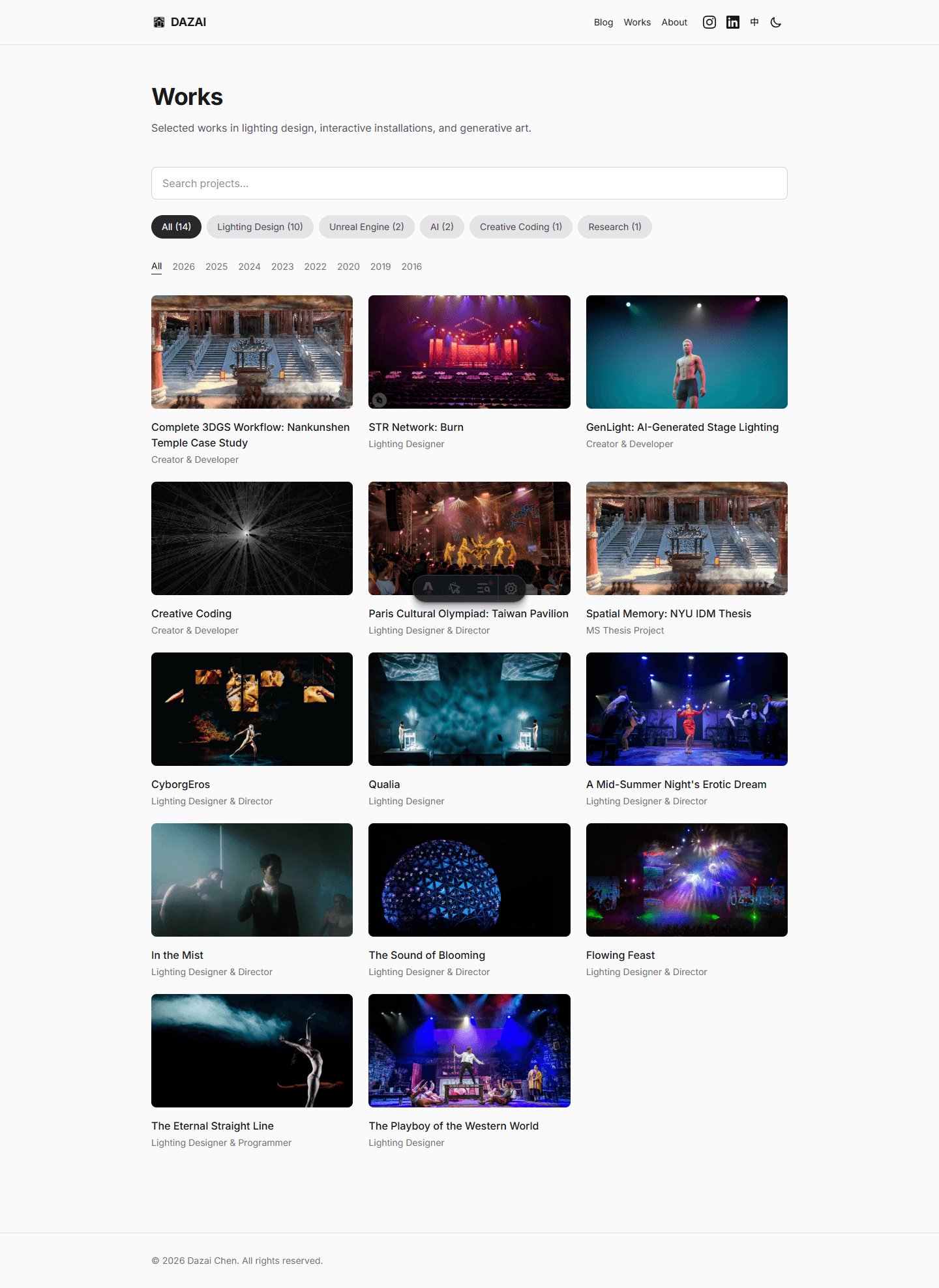
Added a year filter to the Works page — a simple text + underline style. Small feature, but it immediately made the portfolio feel more navigable when you have projects spanning 2016-2026.
Day 14: SEO, Portfolio Polish, and Looking Forward
SEO Audit
Started the day with a full SEO check. The llms.txt file — which tells AI agents about your site — still had placeholder text like [Your Location] and your@email.com. Updated it with the complete site inventory: 15 published articles, 14 works, 4 experiments.
Checked Google Search Console: 34 pages indexed, traffic from US (50%), UK, Japan, Singapore (17% each). The Japan traffic was probably people searching for Osamu Dazai (太宰治), not me.
Massive Portfolio Update
The bulk of Day 14 was enriching 6 works projects with new visual materials — lighting tests, previz renders, smoke flow diagrams, production photos. Every update in both EN and ZH:
- The Playboy of the Western World — Added lighting test photos (silhouette, handmade kerosene lamp, LED fireplace), a new previz render, and 2 production photos. Replaced the light plot with the final version.
- The Eternal Straight Line — Added a smoke flow control diagram explaining how temperature and airflow create the fog layer effect. Added 3 production photos.
- The Sound of Blooming — Added a structure overview photo, SketchUp previz, new light plot, and 2 production photos. Created a new “The Installation” section.
- Flowing Feast — Added 1 production photo.
- A Midsummer Night’s Erotic Dream — Added 1 production photo.
- Qualia — Updated tools tags.
Also standardized all tools/tags across lighting design projects — replacing software names (Wysiwyg, SketchUp) with descriptive labels (Lighting Design, Outdoor, Immersive).
Lead Capture Form
Created a Google Form for readers interested in learning Claude Code or building their own website. Added the form link to 7 article pairs (14 files total) — all Claude Code and web development related articles.
Site Snapshot
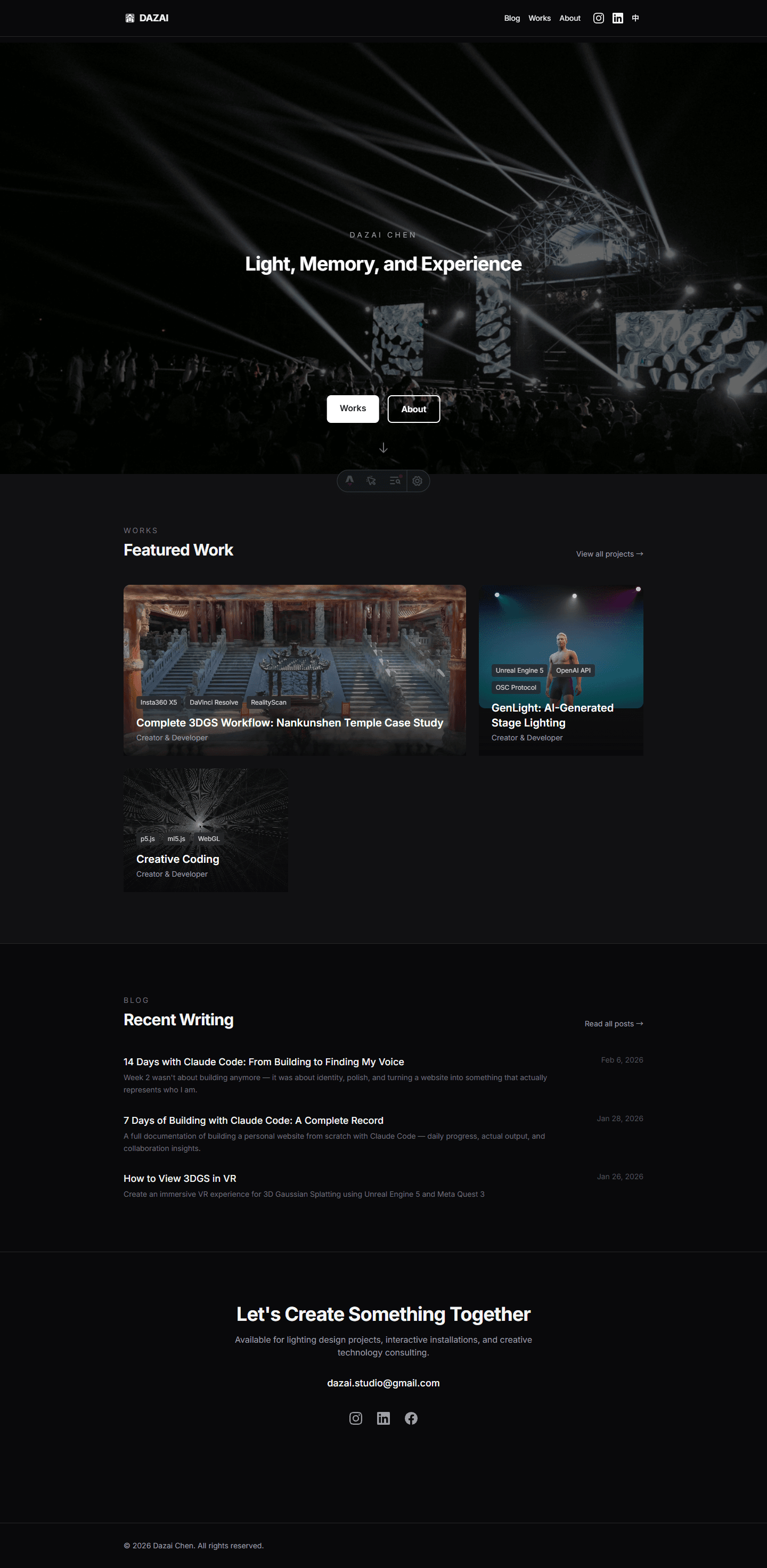
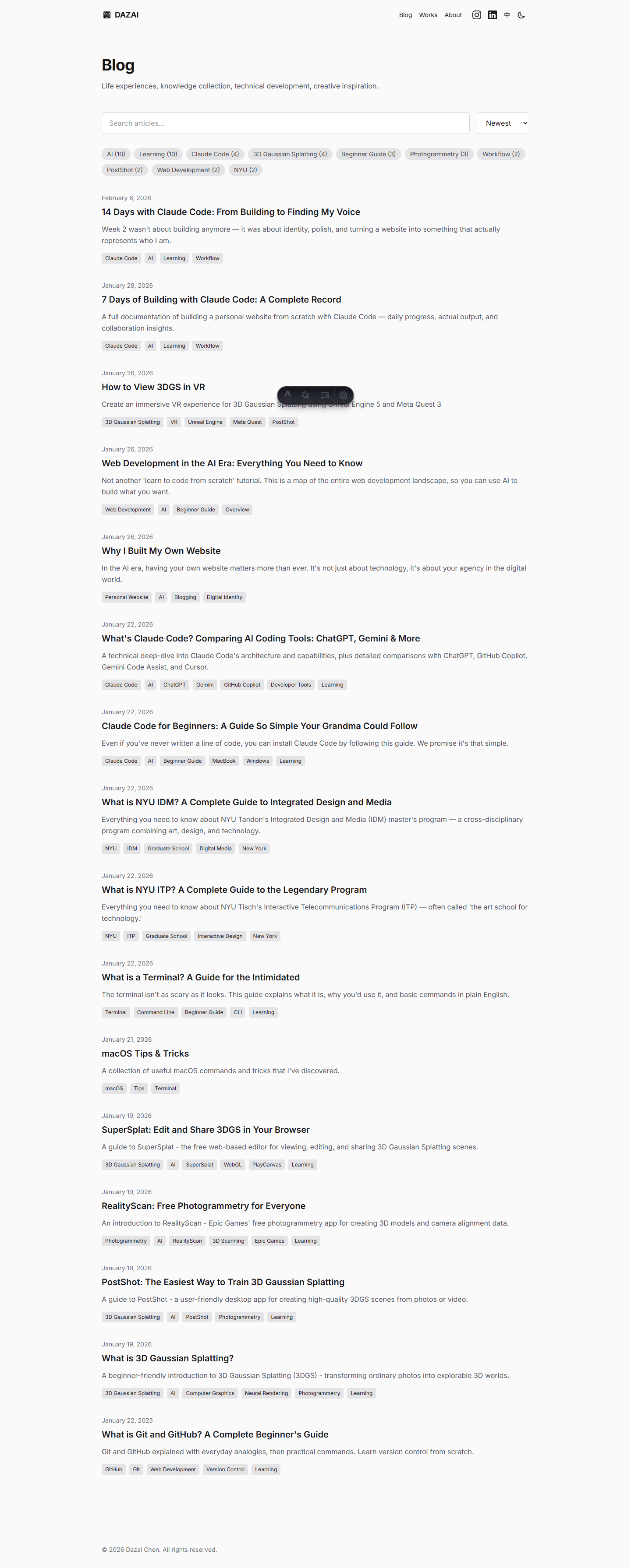
Used Puppeteer to automatically capture full-page screenshots of the homepage, blog, works, and about pages — a visual timestamp of what the site looks like on Day 14. This way, when we write Week 3 or Week 4, we can look back and see how the site evolved.
What Changed Between Week 1 and Week 2
Week 1 was about building. Week 2 was about identity.
In Week 1, the question was: can we ship this? The answer was yes, impressively fast. Thirty articles, interactive components, bilingual everything.
In Week 2, the question shifted: is this actually me? That’s a fundamentally different problem. Claude can write an About page in seconds, but it took three drafts and a day of thinking to find the right voice. Claude can document a lighting design project in minutes, but choosing which details matter — the red lantern problem in Paris, the beam formation logic in Tainan — that requires lived experience.
The Portfolio Revelation
Documenting my lighting design work was unexpectedly emotional. These projects existed in my memory but never had a proper home. Writing them down — the tech specs, the design decisions, the creative challenges — felt like giving them the respect they deserved.
And here’s the thing: I wouldn’t have done it without AI. Not because it’s hard to write, but because the friction was too high. Setting up image grids, compressing videos, building comparison sliders, creating bilingual versions — that overhead killed the motivation. Remove the friction, and suddenly you want to document everything.
AI as Mirror
Something unexpected happened during the About page rewrites. Each time Claude drafted a version, I’d read it and think: that’s not wrong, but it’s not me. The AI became a mirror — it showed me versions of myself that I could accept or reject, and through that process, I found what actually resonated.
The final About page doesn’t sound like AI wrote it. But AI was essential to the process of getting there.
Technical Patterns from Week 2
Effective Patterns
Batch content updates
Add contact section to all 56 blog and works filesClaude’s parallel agents handle this efficiently. The same task manually would take an hour.
Component iteration
The slider is stuttering → switch from useState to useRefQuick feedback loops. Describe the problem, get a fix, test immediately.
Video compression pipeline
Compress this video, keep quality reasonable, add faststart for webClaude knows ffmpeg flags. I judge the output quality.
What Doesn’t Work
- Voice and tone — AI defaults to generic. Always needs human editing for authenticity.
- Creative curation — Which 2 of 6 comparison images to keep? That’s taste, not computation.
- Platform adaptation — Converting a web article to Medium or LinkedIn isn’t just reformatting. Each platform has its own rhythm.
Conclusion
After two weeks, my relationship with Claude Code evolved again.
Week 1: tool — it builds what I describe. Week 2: partner — it handles logistics while I focus on meaning.
The website went from “functional portfolio” to “something I’m genuinely proud of.” Not because of the technology, but because removing friction gave me space to think about what actually matters.
If Week 1 proved that AI can build fast, Week 2 proved something more important: speed creates space for depth.
When you don’t spend hours on image grids and video compression, you spend that time thinking about your About page. When batch updates take 2 minutes instead of an hour, you invest that hour into documenting your best work properly.
That’s the real shift. Not faster output — deeper output.
Site Snapshot — Day 14
The website keeps evolving. Here’s what it looked like on Day 14, captured as a visual record.
Related Articles
- Building with Claude Code — Week 1 - Building from zero
- What is Claude Code? - Full feature breakdown
- Claude Code for Beginners - Installation guide
Sources
- Claude Code Documentation - Official docs
- Anthropic - The company behind Claude
Get in Touch
Want to learn how to use Claude Code, or start building your own website with it? Fill out this form and I’ll get in touch!